Quickstart
Call stateless parsing, knowledge-base search, and OpenAI-compatible Runtime endpoints over HTTP.
The following HTTP endpoints cover parsing, knowledge-base search, chat, and embeddings:
- Document parsing —
POST /api/parse/pdf,POST /api/parse/image - KB full-text search —
POST /v1/kb/search - OpenAI-compatible chat —
POST /v1/chat/completions - Embeddings —
POST /v1/embeddings
Choose a parsing workflow first
| Goal | Guide |
|---|---|
| Upload in the UI, inspect results, attach to an agent | KB walkthrough |
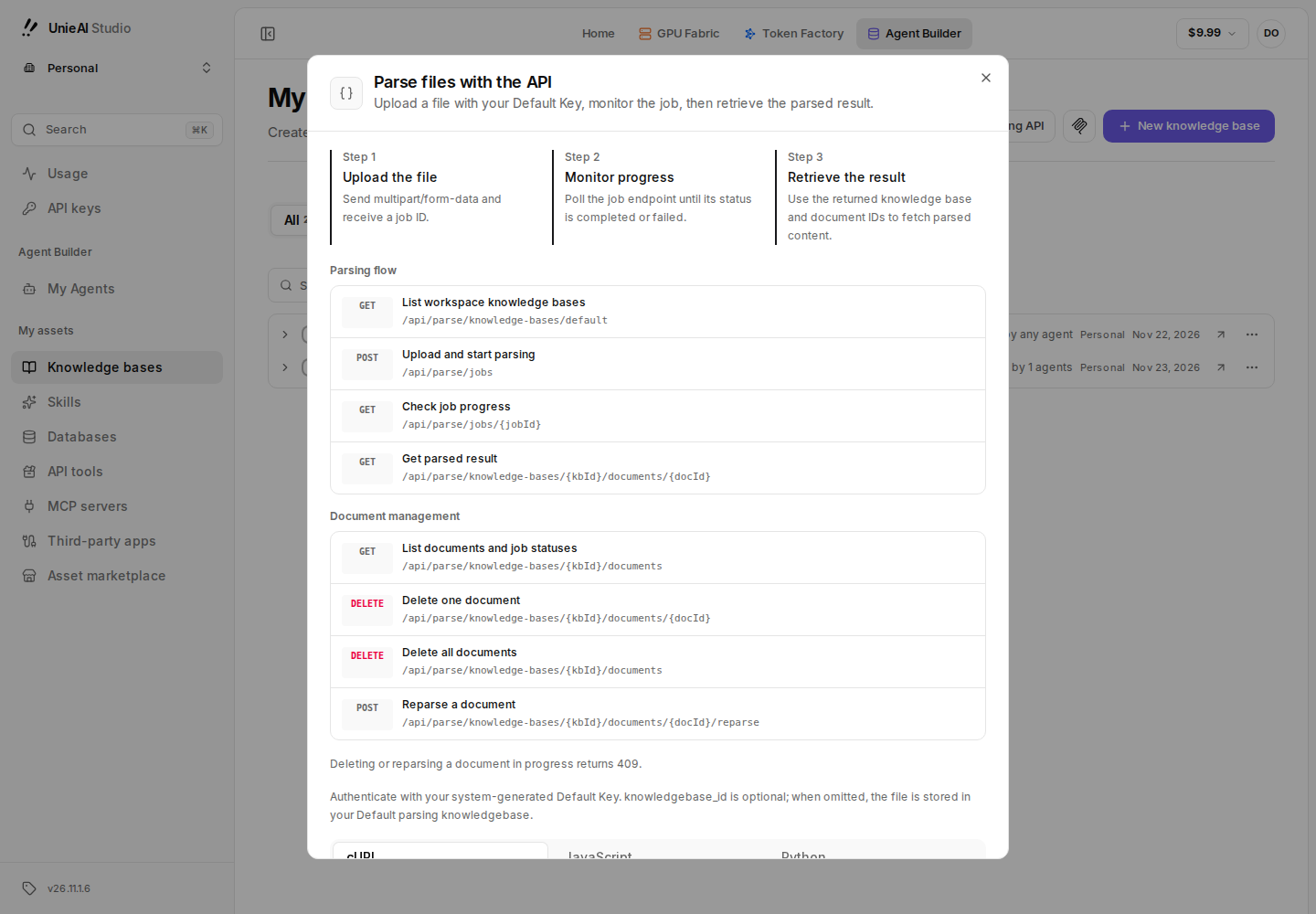
| Upload from code, process in the background, retrieve Markdown/pages | Default Key three-step API |
| Parse PDF/image within one HTTP response without saving a KB | Synchronous examples later on this page |
Background processing uses POST /api/parse/jobs, job polling, then document retrieval. Personal and project Default Keys use their respective project or personal account parsing KBs. The synchronous examples use personal user keys: these authentication rules differ.
Authentication
Every request needs a UnieAI Studio API key sent as Authorization: Bearer. For one key that works with every example on this page, select your personal account and create a personal key under Project or personal account → API Keys. The stateless /api/parse/pdf and /api/parse/image routes use personal user keys. The /api/parse/jobs upload, status, and document routes accept a personal or project Default Key; uploads without knowledgebase_id go to that key's project or personal account-specific Default parsing knowledgebase. /v1/kb/search and the Runtime endpoints support their applicable project or project key flows.
An administrator must also configure a runtime-ready VLM parser under Admin panel → System Models → UnieAI VLM parser, and the key owner must be able to use that model, before PDF or image parsing can succeed.
const STUDIO_BASE_URL = "https://your-studio-domain.com";
const RUNTIME_BASE_URL = "https://your-runtime-domain.com";
const API_KEY = "sk-your-api-key";

async function readJson(response) {
  const payload = await response.json().catch(() => null);
  if (!response.ok) {
    const error = new Error(payload?.error?.message || `HTTP ${response.status}`);
    error.status = response.status;
    error.code = payload?.error?.code || null;
    error.requestId = payload?.error?.request_id || response.headers.get("x-request-id");
    throw error;
  }
  return payload;
}
import requests
STUDIO_BASE_URL = "https://your-studio-domain.com"
RUNTIME_BASE_URL = "https://your-runtime-domain.com"
HEADERS = {"Authorization": "Bearer sk-your-api-key"}export UNIEAI_STUDIO_URL="https://your-studio-domain.com"
export UNIEAI_RUNTIME_URL="https://your-runtime-domain.com"
export UNIEAI_API_KEY="sk-your-api-key"Parser endpoints (/api/parse/*) are served by Studio Web, while /v1/* endpoints are served by Runtime. Use separate base URLs unless your deployment exposes both through one gateway. Run these examples on a trusted backend; do not place a long-lived API key in browser code.
Parse a document
The example below parses a PDF into structured pages containing text, VLM transcription, and figure metadata. Only the PDF endpoint supports chunk=true; the returned chunks are not persisted or indexed. The image endpoint returns a single content value and figure metadata and ignores the chunk option.
import { readFile } from "node:fs/promises";

const bytes = await readFile("document.pdf");
const form = new FormData();
form.append("file", new Blob([bytes], { type: "application/pdf" }), "document.pdf");

const response = await fetch(`${STUDIO_BASE_URL}/api/parse/pdf?chunk=true`, {
  method: "POST",
  headers: { Authorization: `Bearer ${API_KEY}` },
  body: form,
});
const result = await readJson(response);

console.log(result.data.page_count);
console.log(result.data.pages[0].summaryContent);
with open("document.pdf", "rb") as f:
resp = requests.post(
f"{STUDIO_BASE_URL}/api/parse/pdf?chunk=true",
headers=HEADERS,
files={"file": ("document.pdf", f, "application/pdf")},
)
resp.raise_for_status()
print(resp.json()["data"]["page_count"])curl -X POST "$UNIEAI_STUDIO_URL/api/parse/pdf?chunk=true" \
-H "Authorization: Bearer $UNIEAI_API_KEY" \
-F "file=@document.pdf"Search a knowledge base
Use KB Super to search complete parsed text that the API-key identity can access, returning matching content and source locations. This endpoint does not perform vector or BM25 search, or upload or parse new documents. Available inline image references resolve to loadable signed URLs. Check the source and surrounding context before using a match to answer a question.
const response = await fetch(`${RUNTIME_BASE_URL}/v1/kb/search`, {
  method: "POST",
  headers: {
    Authorization: `Bearer ${API_KEY}`,
    "Content-Type": "application/json",
  },
  body: JSON.stringify({
    kb_id: "kb_xxx",
    query: "How many days of paternity leave?",
    limit: 5,
  }),
});
const { data } = await readJson(response);

for (const item of data.results) {
  console.log(item.score, item.content);
}
resp = requests.post(
f"{RUNTIME_BASE_URL}/v1/kb/search",
headers={**HEADERS, "Content-Type": "application/json"},
json={"kb_id": "kb_xxx", "query": "How many days of paternity leave?", "limit": 5},
)
for item in resp.json()["data"]["results"]:
print(item["score"], item["content"])curl -X POST "$UNIEAI_RUNTIME_URL/v1/kb/search" \
-H "Authorization: Bearer $UNIEAI_API_KEY" \
-H "Content-Type: application/json" \
-d '{"kb_id":"kb_xxx","query":"How many days of paternity leave?","limit":5}'Chat with a RAG-enabled Customize Model
chat calls the OpenAI-compatible Chat Completions endpoint. To use RAG, first attach knowledge bases to the Customize Model and configure its RAG project or personal account. Runtime uses the knowledge bases assigned to that model; a request cannot select arbitrary knowledge bases with knowledgeBaseIds.
const response = await fetch(`${RUNTIME_BASE_URL}/v1/chat/completions`, {
  method: "POST",
  headers: {
    Authorization: `Bearer ${API_KEY}`,
    "Content-Type": "application/json",
  },
  body: JSON.stringify({
    model: "your-model-slug",
    messages: [{ role: "user", content: "How many days of paternity leave?" }],
    stream: false,
  }),
});
const completion = await readJson(response);
console.log(completion.choices[0].message.content);
Streaming
const res = await fetch(`${RUNTIME_BASE_URL}/v1/chat/completions`, {
  method: "POST",
  headers: {
    Authorization: `Bearer ${API_KEY}`,
    "Content-Type": "application/json",
    Accept: "text/event-stream",
  },
  body: JSON.stringify({
    model: "your-model-slug",
    messages: [{ role: "user", content: "Summarize this policy in three bullets" }],
    stream: true,
  }),
});

if (!res.ok) throw new Error(`Chat failed with HTTP ${res.status}`);

const reader = res.body.getReader();
const decoder = new TextDecoder();
for (;;) {
  const { value, done } = await reader.read();
  if (done) break;
  process.stdout.write(decoder.decode(value));
}
Error handling
Error responses use the platform error shape. The readJson helper above converts them into an Error with status, code, and requestId fields.
try {
  const response = await fetch(`${RUNTIME_BASE_URL}/v1/kb/search`, {
    method: "POST",
    headers: {
      Authorization: `Bearer ${API_KEY}`,
      "Content-Type": "application/json",
    },
    body: JSON.stringify({ kb_id: "kb_xxx", query: "..." }),
  });
  await readJson(response);
} catch (err) {
  console.error(err.status, err.code, err.requestId, err.message);
}| code | status | description |
|---|---|---|
unauthorized | 401 | Missing or invalid API key |
invalid_request | 400 | Missing required field or bad parameter |
forbidden | 403 | No access to that knowledge base |